Home
SQL Image Viewer online help Prev Page Prev Page
Introduction
About SQL Image Viewer
Version history
Contact us
User Guide
System requirements
Editor command selection
Exporting large number of images
Folders and files
Reference Guide
Main menu
Connect to Database
Connecting to Firebird databases
Connecting to MySQL databases
Connecting to Oracle databases
Connecting to SQLite databases
Connecting to SQL Server databases
Connecting using ODBC
Connecting to a DB2 database
Connecting to a PostgreSQL database
Options
General options
Editor options
Thumbnail options
Image view
Check for updates
About
The work area
SQL editor
Table browser
Results
Other binary data
Image viewer
Hex viewer
Export items wizard
Exporting Microsoft Access OLE data
Post-processing Office files
Image options
File naming convention
Datetime format specifiers
Command line interface
Parameters, logs and exit codes
Advanced options
CROP option
Troubleshooting
Expired trial
Invalid licenses
Unidentified images or binary data
DICOM images

Post-processing Office files

SQL Image Viewer allows some post-processing functions to be performed on Microsoft Excel and Word files. In order to use this functions, you need to have a version of Microsoft Excel and/or Word that can open the exported files.

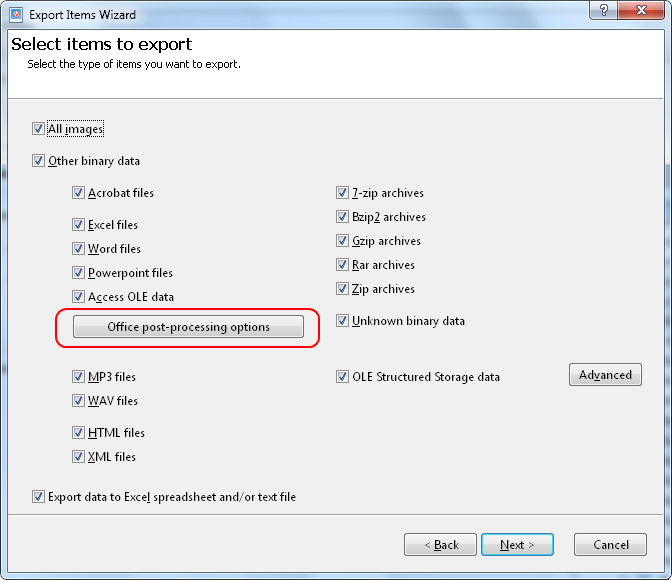
To open the post-processing options, click on the 'Office post-processing options' in the Export Items WIzard.

export-step1e

This then opens the post-processing options dialog.
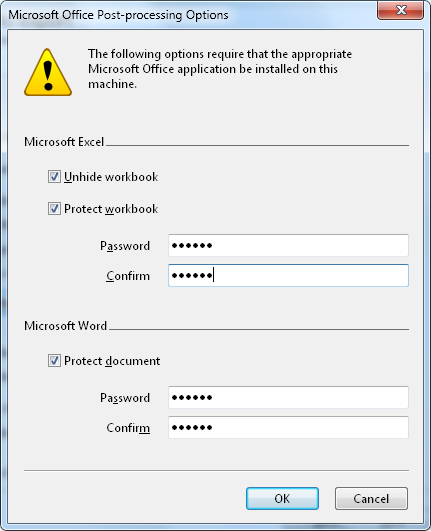
export-step1d

Select the 'Unhide workbook'
option to unhide the workbook if it is hidden when exported. Select the 'Protect workbook' option and enter a password to protect the exported Microsoft Excel files.

Select the 'Protect document'
option and enter a password to protect the exported Microsoft Word files.